¶ Integration Notw
| Manufacturer | Magic Home |
| Model | See Below |
| Driver Name | Magic Home |
| Driver Version | 24.08.16.00 |
| Document / Driver Revision | Aug 16, 2024 |
| Core Min / Max Tested | 8.8.xx |
¶ Overview
This is a two-way driver to control and get feedback from supported Magic Home smart light products.
¶ Supported Features
The following options are supported by [this driver]:
This Driver supports
- Auto Discovery and Installation of All supported lights
- On/Off using network
- Control RGB Settings
- Control Brightness Settings
- Control Temperature Color Settings***
- Read Feedback from Magic Home
- Sync with Magic Home if changes occur outside of Elan
The list of the features below is supported in the driver and will be installed by default where discovered by the driver. However, some features may not be supported by the hardware or the lights attached. Refer to the hardware/light guide for the supported features.
- RGB Slider from 0 to 255
- RGB Brightness (Dimmer) for 0 to 100 WarmColorTemp, Slider Values from 0 to 255 ColdColorTemp, Slider Values from 0 to 255 ColorMixer, Slider Values from 0 to 255
- Red, Slider Values from 0 to 255
- Green, Slider Values from 0 to 255
- Blue, Slider Values from 0 to 255
¶ Special Effects
MicSensitivity, Slider Values from 0 to 65 For Models that Support it Seven Color Cross Fade, Transition Speed Values from 0 to 31 Red Gradual Change, Transition Speed Values from 0 to 31
- Green Gradual Change, Transition Speed Values from 0 to 31 Blue Gradual Change, Transition Speed Values from 0 to 31 Yellow Gradual Change, Transition Speed Values from 0 to 31 Cyan Gradual Change, Transition Speed Values from 0 to 31 Purple Gradual Change, Transition Speed Values from 0 to 31 White Gradual Change, Transition Speed Values from 0 to 31 Red Green Cross Fade, Transition Speed Values from 0 to 31 Red Blue Cross Fade, Transition Speed Values from 0 to 31 Green Blue Cross Fade, Transition Speed Values from 0 to 31 Seven Color Strobe Flash, Transition Speed Values from 0 to 31 Red Strobe Flash, Transition Speed Values from 0 to 31
- Green Strobe Flash, Transition Speed Values from 0 to 31 Blue Strobe Flash, Transition Speed Values from 0 to 31 Yellow Strobe Flash, Transition Speed Values from 0 to 31 Cyan Strobe Flash, Transition Speed Values from 0 to 31 Purple Strobe Flash, Transition Speed Values from 0 to 31 White Strobe Flash, Transition Speed Values from 0 to 31 Seven Color Jumping, Transition Speed Values from 0 to 31.
The following playback options ARE NOT SUPPORTED :
This driver does not support Blue Tooth functions, Music, or Scenes Modes as those are not supported by the Magic Home API.
¶ Driver Configuration
- The Driver uses the LAN Mode. An internet connection is not required. However, all lights must be accessible via network.
- First configure the controller/lights with the Magic Home app on Android or iOS
- Configure and connect the lights. Make sure you can operate the lights directly from the app.
¶ Installation Process
IMPORTANT NOTE:
It is recommended that you follow the below installation process in order to ensure you are running the latest version of the [driver].
- Open Lighting, Lighting Interface, Add New Lighting Interface
- Navigate to the folder where the driver is located and Choose the Magic Home 🡺 OK
- You’ll receive a warning that this is not a Native Elan driver, click OK
- The Driver will automatically go into trial mode for 30 days. Wait for about 10 seconds and the Status will turn Green.

- Set the Polling time – This is the time that Elan will use to sync in case light settings change outside of Elan. If Elan will be the only interface, set this value as large as possible
- Click Apply the Get Devices. The driver will populate all devices connected to the account.
¶ Configuration Details
The following table provides settings used in Configurator …Please refer to the Configurator Reference Guide for more details.
In the table below:
- “<User Defined>”, etc. Type in the desired name for the item.
- “<Auto Detect>”, etc. The system will auto-detect this variable.
| Devices | Variable Name | Settings | Comments |
| Lighting | Name | User Defined (Default: Magic Home) | |
| System # | <Auto Detect> | ||
| Device Type | Ethernet | ||
| Driver Name | Magic Home | ||
| Driver Version | <Auto Detect> | ||
| Driver Vendor | Innovo | ||
| Activation KEY | <User Defined> | ||
| IP Address | NONE | Cloud-Based | |
| Display Name | <User Defined> (Default: Magic Home) | ||
| System # | <Auto Detect> |
¶ Using the Driver
- Add an interface to control the lights from Lighting 🡺 Custom Pages
- NOTE: A sample Template has been included with the driver. Import the template and customize it as needed. Connect the Elements as shown below.
- Create a Text Feedback, RGB, Light Dimmer Control, and Lighting Slider
- Connect the Elements to the proper variable in the driver.
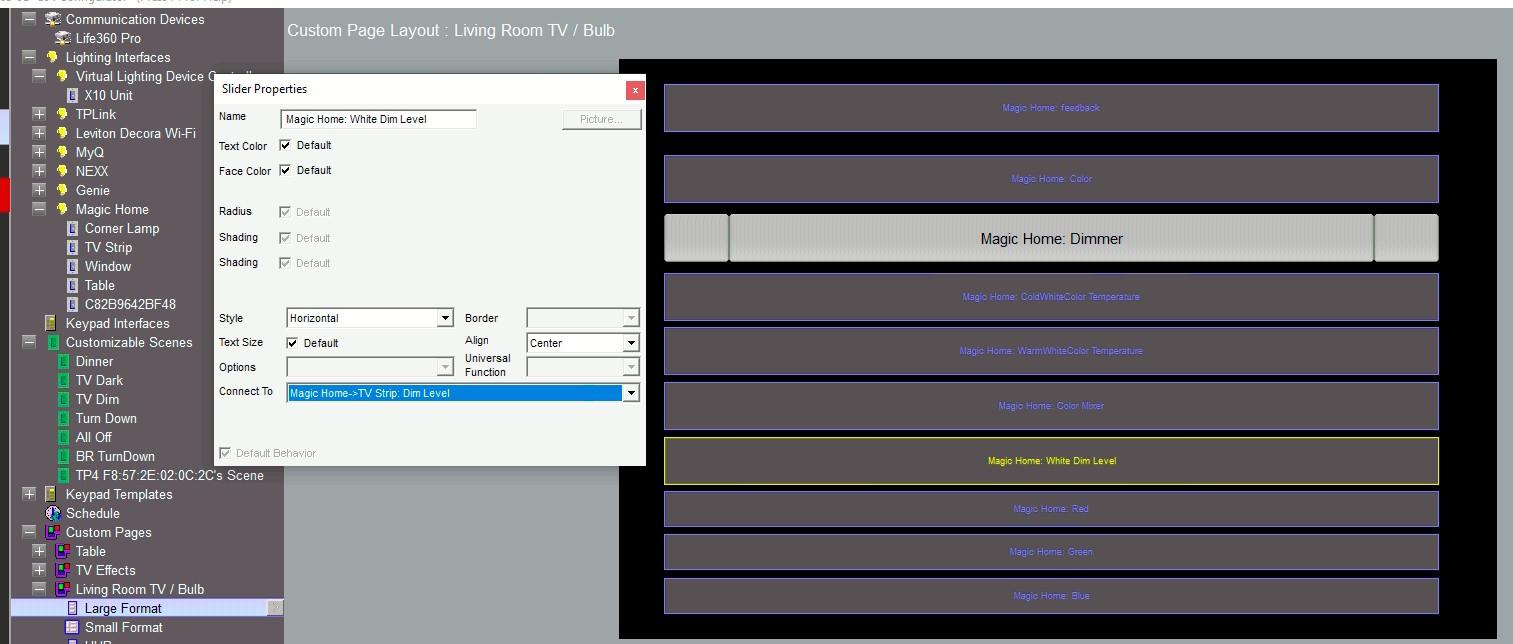
- The driver has a special page for light effects. Magic Home has 22 Special lighting modes. Create an interface and connect the desired effect. The slider acts to slow down or speed up the effect. To exit the effect, click on any of the main lighting controls such as dimmer or color slider.

- Note: The Driver has feedback for the events. This is useful to tell the user if a light is not responding or a command has timed out.
¶ Troubleshooting
- Driver not Activated. Wait 15 seconds after Apply
- Magic Home stops responding sometimes, turn / off the light switch to the controller
- Controller falls offline. Make sure that the location has a very strong WiFi network and/or the controller is as close as possible.